Manual HR and Payroll Pressure
How JTN TMS runs leave, payroll and statutory deductions for office staff and drivers from one flow.
The problem
What it looks like without a system
- Payroll is rebuilt in a spreadsheet every month.
- Leave is approved on paper and forgotten at payroll time.
- Statutory deductions are calculated by hand and checked under pressure.
- Drivers call the office to ask for their payslips.
How JTN TMS handles it
Payroll is confirmed month by month, not rebuilt in a spreadsheet
-
1
Staff, departments and designations
Employees, drivers included, are organised by department and designation.
-
2
Leave with approvals
Leave requests move through approval against configured leave types, and loan requests follow the same flow.
-
3
A monthly payroll workspace
Pick the month, confirm which employees are included, then track disbursement and draft payslips.
-
4
Earnings and statutory deductions
Earning heads and deductions feed a payroll summary with PAYE, NSSF, SHIF and the housing levy.
-
5
Payslips where staff can reach them
Payroll reports export to Excel and PDF, and drivers see their payslips in the driver portal.
Inside the system
The screens your team works from
HR
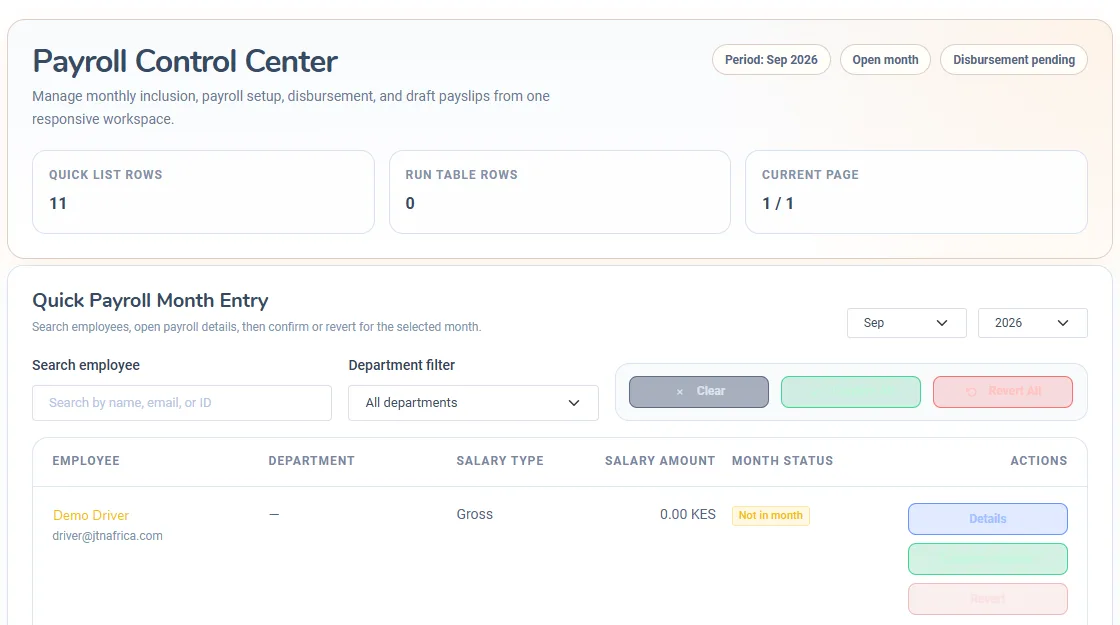
Payroll control center
Choose the period, search employees, filter by department, and confirm or revert who is in the month.
Keep exploring
Other problems it removes
Next step
See it handle this in your own operation
A walkthrough starts with HR and payroll and uses the modules that match how your team already works.
Talk to our sales team
Pick whichever channel suits you. The message is already written.
NAIROBI